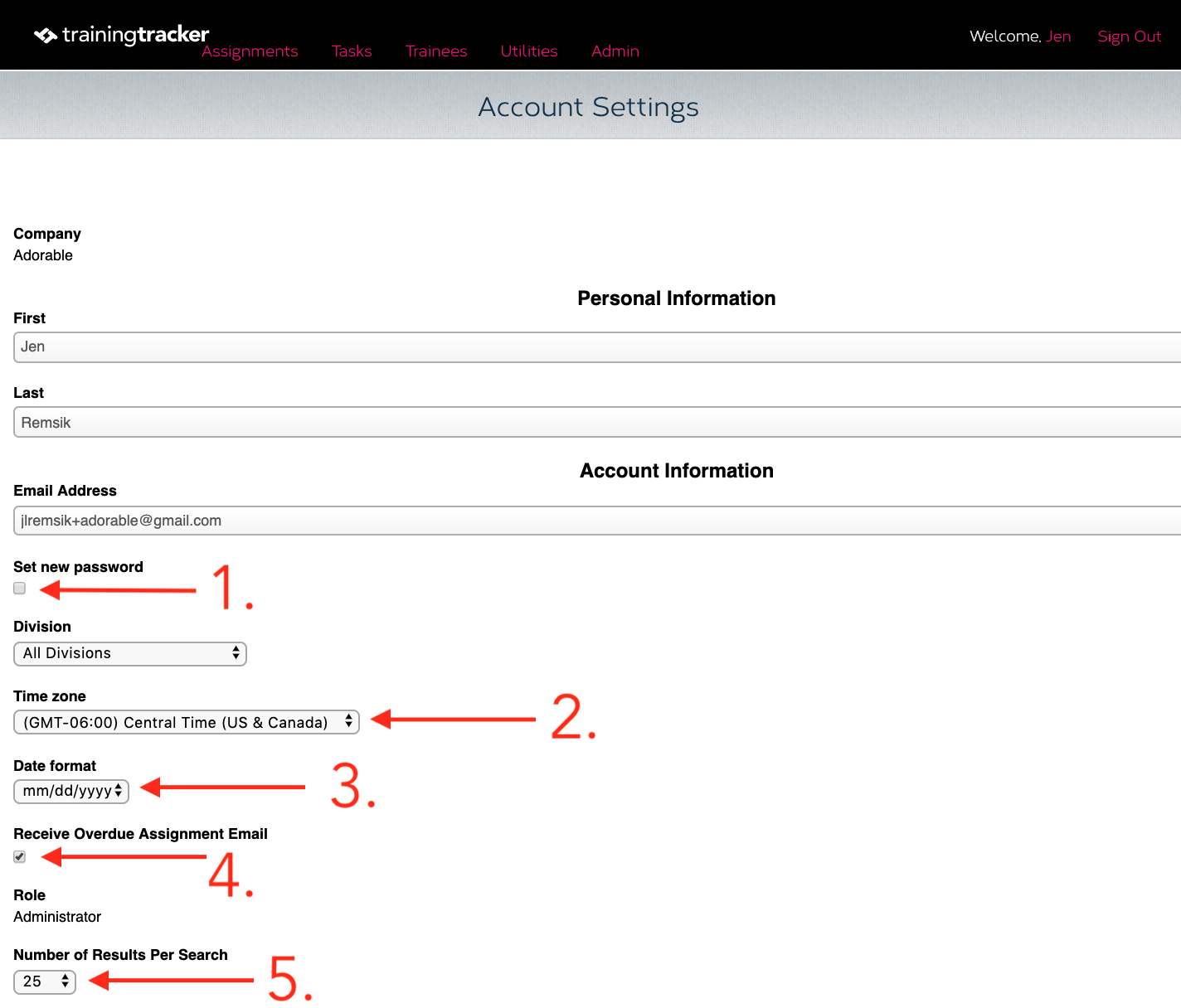
Did you know that each user who uses Training Tracker has their own profile page? To see your profile, click on your name next to “Welcome” in the upper right-hand corner. Below are the features of the profile page.
What can you do on your profile page?
- Reset password - Check the box and click save. The software will walk you through the process of setting a new password
- Set timezone
- Select date format
- Opt-out of receiving overdue Assignment emails - For more information, please reference Alerts are Coming to Training Tracker!
- Set the number of search results - For more information, please reference Did you know… Number of Results per Search
The five things you can currently do on the profile page are listed above. Coming soon, you will be able to see how much storage space you have used and how much is available. You will also be able to purchase additional users beyond your original setup.
We are always looking for ways to make Training Tracker more useful to you, so if there are other features you’d like to see, please submit a request through our support portal, and you may see your idea in a future update!
Jen CEO, Training Tracker Software